Linked in quiz

LinkedIn Autodesk fusion 360 quiz
# How can you edit a feature?
- [ ] Select the feature, press Delete, and then create a new feature.
- [x] Right-click the feature and select Edit Feature.
- [ ] Keep clicking Undo until the feature is gone.
- [ ] Find the feature in the browser, select Remove, and then create a new feature.
# Which tool creates a plane normal to a sketch path or edge?
- [ ] Plane Through Two Edges
- [x] Plane Along Path
- [ ] Plane at Angle
- [ ] Plane Through Three Points
# Which tool measures the precise distance between two points, and creates dimensions that are parallel to the locations of objects?
- [x] Aligned Dimension
- [ ] Linear Dimension
- [ ] Angular Dimension
- [ ] Ordinate Dimension
# How many holes were used in the making of this object?
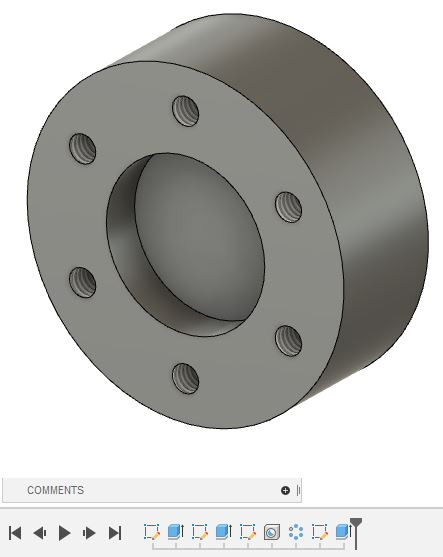
- [x] 1
- [ ] 2
- [ ] 3
- [ ] 4
- [ ] 5
- [ ] 6
- [ ] 7
- [ ] 8
# In simulation, which constraint prevents movement in a specific direction?
- [ ] frictionless
- [ ] prescribed displacement
- [ ] pin
- [x] fixed
# In the CAM workspace, which strategy removes a part's interior cavity?
- [ ] Slot
- [ ] 2D Pocket
- [ ] Bore
- [ ] 2D Contour
# What does the Zebra Analysis tool do?
- [ ] It applies a metal render.
- [ ] It fixes bodies.
- [ ] It checks a body's continuity.
- [ ] It splits bodies apart.
# Which command creates a plane at the midpoint between two faces or work planes?
- [ ] Midplane
- [ ] Plane Tangent to Face at Point
- [ ] Offset Plane
- [ ] Plane at Angle
# Which hole type automatically enters a diameter value based on the type of fastener it will accomodate?
- [x] Clearance
- [ ] Simple
- [ ] Drilled
- [ ] Through
# Which workspace creates components made from thin, premade material formed into specific shapes?
- [ ] Mesh
- [ ] Simulation
- [ ] Animation
- [ ] Sheet Metal
# What is required to invite other people into your project folder?
- [ ] a name
- [x] an email address
- [ ] an IP address
- [ ] a phone number
# Which tool connects two joints in a way that the motion of one joint can drive the motion of another joint?
- [ ] Drive Joints
- [ ] As-built Joint
- [ ] Motion Study
- [ ] Motion Link
# Which joint type allows components to translate along two axes and rotate around a single axis?
- [ ] slider
- [ ] revolute
- [x] planar
- [ ] pin-slot
# Which view shows a drawing part at an enlarged scale?
- [x] detail view
- [ ] section view
- [ ] base view
- [ ] projected view
# Which file type is not a drawing output?
- [ ] DWG file
- [x] CSV file
- [ ] STEP file
- [ ] PDF file
# What command do you use to understand the relationship between multiple joints?
- [ ] Lock
- [ ] Animate Joint
- [ ] Animate Model
- [ ] Motion Link
# What translator converts the screen toolpath into language the CNC machine understands?
- [x] a post processor
- [ ] G-code
- [ ] NC-code
- [ ] a code processor
# Which pattern tool copies objects around a selected axis?
- [ ] Rectangular Pattern
- [ ] Pattern on Path
- [ ] Mirror Plane
- [ ] Circular Pattern
# What is the initial view placed in a drawing called?
- [x] base view
- [ ] detail view
- [ ] section view
- [ ] main view
# Which command performs Boolean operations between solid bodies?
- [ ] Draft
- [ ] Press
- [ ] Pull
- [x] Combine
- [ ] Scale
# In the CAM workspace, which strategy removes a part's interior cavity?
- [ ] 2D Contour
- [ ] 2D Pocket
- [ ] Slot
- [ ] Bore
# What does the Zebra Analysis tool do?
- [x] It checks a body's continuity.
- [ ] It splits bodies apart.
- [ ] It fixes bodies.
- [ ] It applies a metal render.
# You want to set up studies to test your design and see how it performs under various loads and conditions. Which workspace do you use?
- [ ] Animation
- [ ] Mesh
- [x] Simulation
- [ ] Render
# Which type of fillet applies two or more radius values to a selected edge?
- [ ] G2
- [x] Variable Radius
- [ ] Chord Length
- [ ] Smooth
# Which tool analyzes a T-spline body and corrects it?
- [ ] Repair Body
- [ ] Convert
- [ ] Enable Better Performance
- [ ] Make Uniform
# Which pattern tool creates copies of objects in one or two directions?
- [ ] Pattern on Path
- [ ] Mirror Plane
- [ ] Rectangular Pattern
- [ ] Circular Pattern
# Which command shows the movement of the joint only, and does not take into account other grounded joints or any external effects on the joint?
- [ ] Suppress
- [ ] Animate Model
- [ ] Drive Joints
- [ ] Animate Joint
# How many sketches are required to create this object?

- [x] Two
- [ ] Three
- [ ] None
- [ ] One
# Which option changes the onscreen appearance of a freeform body to a box, control point, or smooth display?
- [ ] Uniform
- [ ] Repair Body
- [x] Display Mode
- [ ] Enable Better Performance
# Which command splits a body using surfaces generated from its outline curves?
- [x] Split Body
- [ ] Split Component
- [ ] Silhouette Split
- [ ] Split Face
# What controls the position and motion between components?
- [ ] Assembly constraints
- [ ] Motion Link
- [ ] Motion Control
- [x] Joints
# Which command merges surfaces to make a single surface body?
- [ ] Combine
- [ ] Unite
- [x] Join
- [ ] Stitch
# Which command uses an open sketch curve to create a thin feature?
- [ ] Thread
- [x] Rib
- [ ] Loft
- [ ] sweep
# Which joint type allows components to rotate and translate along the same axis?
- [ ] Rigid
- [ ] Cylindrical
- [ ] Revolute
- [ ] Ball
# Which tool hollows out a solid model and removes one or more faces?
- [ ] Thicken
- [ ] Open
- [ ] Offset
- [x] Shell
# Which analysis tool generates a cutaway view of the model at a single plane?
- [ ] Segment
- [x] Section
- [ ] Detail
- [ ] Projection
# Which is not an appearance type available in the Render workspace?
- [x] Bodies
- [ ] Plastic
- [ ] Wood
- [ ] Metal
About Us

Lorem ipsum dolor sit amet, consetetur sadipscing elitr, sed diam nonumy eirmod tempor invidunt ut labore et dolore magna aliquyam erat, sed diam voluptua.
Know More